Controls (Shooter Type A)
You can select from 4 types of controls.
Shooter Type A is recommended for fans of first-person shooters (FPS).
- *You can change the control type using [OPTIONS] on the Pause Menu.
- *With Type A, CQC is assigned to , while with Type B, it is the button.
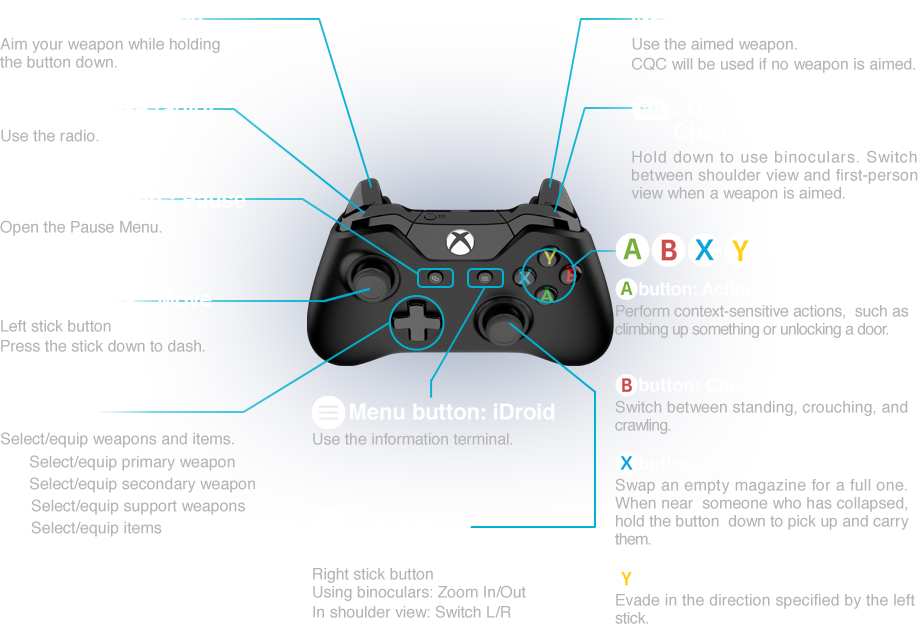

- : Ready Weapon
- Aim your weapon while holding the button down.
- : Attack/CQC
- Use the aimed weapon.
CQC will be used if no weapon is aimed.
- : Call (Use radio)
- Use the radio.
- : Use binoculars/Change view
- Hold down to use binoculars. Switch between shoulder view and first-person view when a weapon is aimed.
- View button: Pause
- Open the Pause Menu.
- Menu button: iDroid
- Use the information terminal.
- Left stick: Move
- Left stick button
Press the stick down to dash.
- Right stick: Control Camera
- Right stick button
Using binoculars: Zoom In/Out
In shoulder view: Switch L/R
- D-pad
- Select/equip weapons and items.
: Select/equip primary weapon
: Select/equip secondary weapon
: Select/equip support weapons
: Select/equip items
- buttons
-
button: Action (context-sensitive)
Perform context-sensitive actions, such as climbing up something or unlocking a door.
button: Change Stance
Switch between standing, crouching, and crawling.
button: Reload/(Hold) Carry
Swap an empty magazine for a full one. When near someone who has collapsed, hold the button down to pick up and carry them.
button: Quick Dive
Evade in the direction specified by the left stick.
 The rest of this manual conforms to Action Type A. Please remember this if you will be using other control types.


